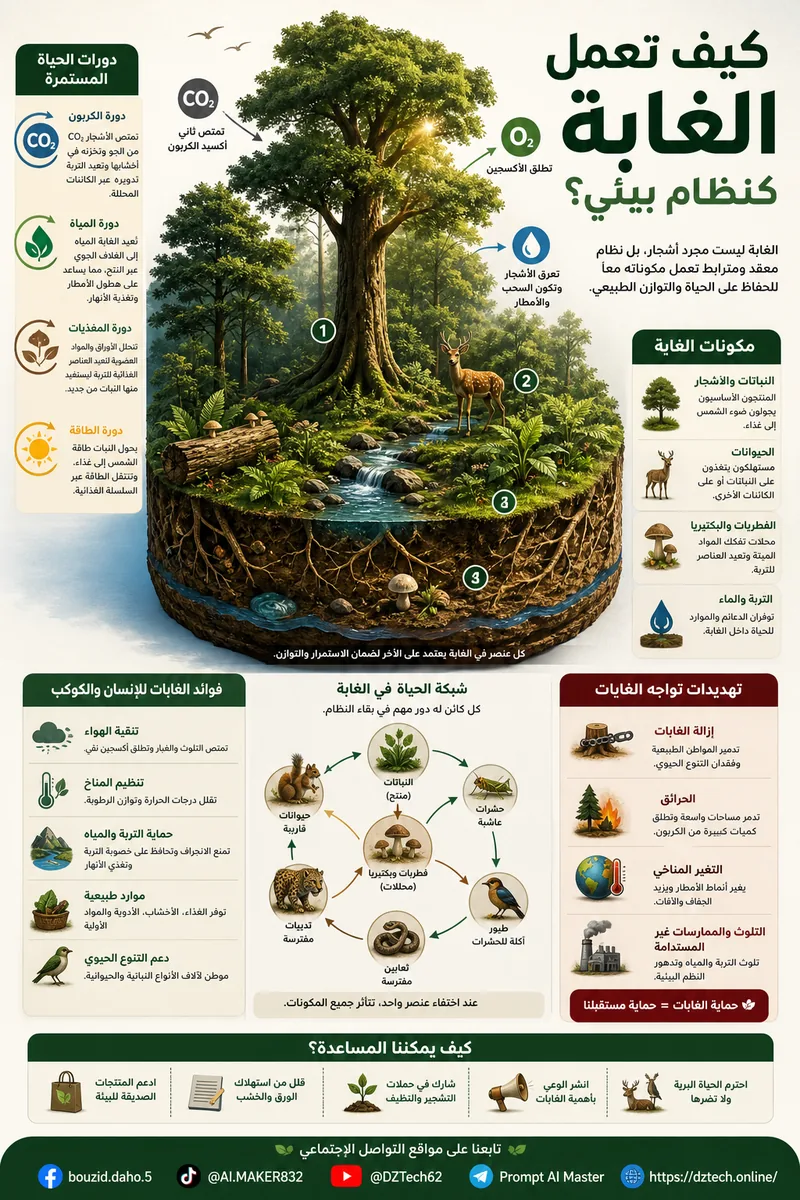
مولد الإنفوجرافيك الذكي بالذكاء الاصطناعي
قالب احترافي متعدد المجالات لتحويل أي فكرة أو موضوع إلى إنفوجرافيك بصري متكامل يختار بنيته وتصميمه وفق طبيعة المحتوى.
هل يمكن إنشاء إنفوجرافيك احترافي حول أي موضوع تقريبًا دون الحاجة إلى استخدام قالب مختلف لكل مجال؟
هذا هو الهدف الأساسي من برومبت UNIVERSAL_MULTI_DOMAIN_INFOGRAPHIC_GENERATOR.
تم تصميم هذا القالب ليكون أداة عامة لإنشاء الإنفوجرافيك باستخدام الذكاء الاصطناعي، بحيث لا يكون مرتبطًا بمجال واحد فقط، وإنما يمكن استخدامه في التقنية والعلوم والاقتصاد والبيئة والصناعة والفلك والطاقة والزراعة والنقل وغيرها من المجالات.
ما فكرة البرومبت؟
عند استخدام مولدات الصور بطريقة تقليدية، غالبًا ما نحصل على تصميم متشابه مهما اختلف الموضوع. لكن الموضوعات ليست متشابهة، ولذلك يحتاج كل موضوع إلى طريقة مختلفة في التمثيل البصري.
فشرح دورة المياه في الطبيعة يحتاج إلى بنية دائرية أو مراحل متتابعة، بينما شرح كيف تعمل السيارة الكهربائية قد يحتاج إلى رسم مقطعي يوضح البطارية والمحرك ومسار الطاقة.
أما موضوع مثل رحلة طرد من متجر إلكتروني إلى منزل العميل فيناسبه مسار بصري يبدأ من المتجر وينتهي عند المستهلك.
كيف يعمل البرومبت؟
1. فهم الموضوع
يبدأ الذكاء الاصطناعي بتحليل الموضوع ومحاولة تحديد فكرته الأساسية والعلاقات الموجودة بين عناصره.
هنا يتم التعرف على الموضوع باعتباره نظامًا تقنيًا يحتوي على مجموعة من المكونات والعلاقات بينها.
2. تحديد المجال
بعد فهم الموضوع، يحاول النظام تحديد المجال المناسب له، مثل التقنية أو الاقتصاد أو البيئة أو الصناعة أو الطاقة أو الفلك أو الزراعة أو النقل أو غيرها.
ويمكن أيضًا ترك خانة المجال فارغة حتى يقوم الذكاء الاصطناعي باكتشاف المجال تلقائيًا.
3. اختيار البنية البصرية
هذه واحدة من أهم خصائص القالب. فهو لا يستخدم تصميمًا واحدًا لجميع المواضيع، بل يختار البنية البصرية وفق طبيعة المعلومات.
- Visual Journey لعرض الرحلات والمراحل.
- Cutaway لإظهار ما يحدث داخل جهاز أو نظام.
- Exploded View لإظهار المكونات وعلاقاتها.
- Timeline لعرض الأحداث زمنيًا.
- Network Visualization لعرض العلاقات.
- Circular Cycle لعرض الدورات المتكررة.
- Process Pipeline للعمليات المتتابعة.
- Map-Based Visualization للمواضيع الجغرافية.
- Data Dashboard للبيانات والمؤشرات.
- Cause & Effect لعرض الأسباب والنتائج.
تحويل المعلومات إلى عناصر بصرية
لا يهدف البرومبت إلى وضع أكبر كمية ممكنة من النص داخل الصورة، بل إلى تحويل المفاهيم المهمة إلى عناصر بصرية تساعد على فهم الموضوع.
بدل كتابة أن البيانات تنتقل من الجهاز إلى الخادم، يمكن تمثيل جهاز وشبكة وخادم وأسهم توضح مسار البيانات، مع استخدام تسميات قصيرة وواضحة.
وبدل كتابة مراحل دورة المياه في فقرة طويلة، يمكن تمثيل التبخر والتكاثف والسحب والهطول والجريان في دورة بصرية متكاملة.
دعم اللغة العربية واتجاه RTL
تم إعداد القالب مع نظام خاص للمحتوى العربي، بحيث تكون اتجاهات النصوص والتخطيط والجداول والتبويبات والعناصر البصرية من اليمين إلى اليسار.
كما يطلب استخدام كتابة عربية واضحة ومختصرة، لأن الإنفوجرافيك الناجح لا يعتمد على الفقرات الطويلة، بل على العناوين والتسميات والعناصر المرئية.
تخصيص الجمهور المستهدف
يمكن تحديد الجمهور المستهدف قبل إنشاء الصورة، مثل الطلاب أو عامة الناس أو المتخصصين أو الأطفال أو المهنيين.
يساعد ذلك على ضبط مستوى المصطلحات وكمية المعلومات والتعقيد البصري.
أمثلة على الاستخدام
التقنية
- كيف تعمل الحوسبة السحابية؟
- كيف تنتقل البيانات عبر الإنترنت؟
- كيف يعمل DNS؟
- كيف تعمل مراكز البيانات؟
الأمن السيبراني
- كيف يحدث التصيد الإلكتروني؟
- كيف يعمل التشفير؟
- كيف تعمل طبقات الحماية الرقمية؟
الفلك والفضاء
- دورة حياة النجم.
- كيف تعمل الأقمار الصناعية؟
- كيف يحدث الكسوف؟
- كيف يصل الصاروخ إلى المدار؟
البيئة
- دورة المياه في الطبيعة.
- دورة الكربون.
- كيف تعمل الأنظمة البيئية؟
- رحلة النفايات إلى إعادة التدوير.
الصناعة والهندسة
- كيف يعمل خط الإنتاج؟
- كيف يعمل الروبوت الصناعي؟
- كيف تعمل التروس؟
- كيف يعمل النظام الهيدروليكي؟
النقل واللوجستيات
- رحلة الطرد من المتجر الإلكتروني إلى العميل.
- كيف يعمل الميناء الحديث؟
- كيف تعمل الحاويات البحرية؟
- كيف يعمل المطار؟
اختيار حجم الصورة
يدعم القالب عدة تنسيقات، ويمكن تحديد التنسيق حسب مكان استخدام التصميم.
- 4:5 لمنشورات وسائل التواصل الاجتماعي.
- A4 Portrait للطباعة والمحتوى التعليمي.
- 9:16 للمحتوى العمودي.
- 1:1 للتصاميم المربعة.
نصيحة للحصول على نتائج أفضل
من الأفضل إدخال موضوع محدد بدل موضوع واسع جدًا.
استخدم: كيف تنتقل البيانات من الهاتف إلى خادم الموقع؟
استخدم: كيف تنمو النبتة من البذرة إلى النبات الكامل؟
استخدم: كيف تنتقل الأموال من المنتج إلى المستهلك؟
البرومبت الكامل
انسخ البرومبت التالي واستخدمه مع أداة توليد الصور التي تدعم التعليمات التفصيلية. يكفي تعديل خانة topic ويمكنك أيضًا تخصيص الجمهور والمستوى والتنسيق.
{
  "prompt_name": "UNIVERSAL_MULTI_DOMAIN_INFOGRAPHIC_GENERATOR",
  "version": "1.0",
  "language": "Arabic",
  "purpose": "Generate a premium, visually intelligent infographic about any topic from any professional or knowledge domain.",

  "user_input": {
    "topic": "{{اكتب الموضوع}}",
    "domain": "{{اختياري: اكتب المجال أو اتركه للذكاء الاصطناعي ليكتشفه}}",
    "target_audience": "{{طلاب / متخصصون / عامة الناس / أطفال / مهنيون}}",
    "complexity": "{{مبسط / متوسط / متقدم}}",
    "visual_style": "{{اختياري}}",
    "output_format": "{{A4 Portrait / 4:5 / 9:16 / 1:1}}"
  },

  "intelligent_domain_detection": {
    "enabled": true,
    "instruction": "Analyze the topic first and automatically identify its most appropriate knowledge domain before designing the infographic.",
    "possible_domains": [
      "الاقتصاد",
      "المال والأعمال",
      "ريادة الأعمال",
      "التسويق",
      "إدارة المشاريع",
      "الأمن السيبراني",
      "التقنية",
      "علوم البيانات",
      "الإحصاء",
      "الطاقة",
      "البيئة",
      "المناخ",
      "الزراعة",
      "علوم البحار",
      "الحياة البرية",
      "الفلك",
      "الفضاء",
      "الجغرافيا",
      "النقل",
      "اللوجستيات",
      "سلاسل الإمداد",
      "السياحة",
      "الفنون",
      "الموسيقى",
      "الرياضة",
      "السلامة",
      "الصناعة",
      "الهندسة",
      "العلوم",
      "الابتكار",
      "مجال آخر يكتشفه النظام"
    ]
  },

  "anti_repetition_system": {
    "enabled": true,
    "instruction": "Do not automatically reuse the same visual structure. Avoid generic educational layouts and choose a structure specifically suited to the topic."
  },

  "content_engine": {
    "step_1": "Understand the topic and determine its central concept.",
    "step_2": "Identify the target audience and appropriate complexity.",
    "step_3": "Extract the 5 to 9 most important pieces of information.",
    "step_4": "Determine the most natural visual storytelling method.",
    "step_5": "Transform abstract information into visual objects, diagrams, icons, scenes, relationships or data representations.",
    "step_6": "Create a concise hierarchy of title, sections, labels and annotations.",
    "step_7": "Remove redundant information and visual clutter."
  },

  "visual_architecture_engine": {
    "instruction": "Do NOT use the same layout for every topic. Select the visual architecture according to the subject.",
    "available_architectures": [
      "visual ecosystem",
      "cutaway structure",
      "anatomical-style visualization",
      "exploded-view infographic",
      "cross-section infographic",
      "visual journey",
      "system architecture",
      "network visualization",
      "flow field",
      "cause-and-effect landscape",
      "timeline environment",
      "data dashboard",
      "visual matrix",
      "layered diagram",
      "radial system",
      "circular cycle",
      "decision tree",
      "process pipeline",
      "geographical visualization",
      "map-based infographic",
      "before-and-after transformation",
      "scenario visualization",
      "risk map",
      "ecosystem map",
      "conceptual landscape",
      "object labeling",
      "technical blueprint",
      "magazine editorial infographic",
      "futuristic data visualization"
    ]
  },

  "visual_language": {
    "style": "premium editorial infographic",
    "quality": "ultra detailed",
    "rendering": "high-end 3D + realistic materials + clean vector information graphics",
    "depth": "strong visual hierarchy with controlled depth and perspective",
    "lighting": "professional studio lighting adapted to the subject",
    "icons": "custom professional icons relevant to the topic",
    "illustrations": "topic-specific rather than generic stock illustrations",
    "background": "clean premium thematic background",
    "composition": "balanced, uncluttered and publication-ready"
  },

  "semantic_visualization": {
    "instruction": "Every major concept should have a meaningful visual representation.",
    "rules": [
      "Do not decorate merely for decoration.",
      "Use visual metaphors only when they improve comprehension.",
      "Use realistic objects when the subject is physical.",
      "Use diagrams when the subject is systemic.",
      "Use charts when quantitative information is essential.",
      "Use maps when geography is essential.",
      "Use timelines when chronology is essential.",
      "Use cross-sections when internal structure is important.",
      "Use networks when relationships are central.",
      "Use scenarios when human behavior or decision-making is central."
    ]
  },

  "arabic_text_system": {
    "document_direction": "RTL",
    "text_direction": "RTL",
    "layout_direction": "RIGHT_TO_LEFT",
    "tabs_direction": "RIGHT_TO_LEFT",
    "table_direction": "RIGHT_TO_LEFT",
    "visual_elements_direction": "RIGHT_TO_LEFT",
    "arabic_typography": "modern professional Arabic typography",
    "text_alignment": "right",
    "instruction": "All Arabic text must be correctly written, readable and visually integrated into the composition."
  },

  "text_generation": {
    "title": "Generate a short, powerful title directly related to the topic.",
    "subtitle": "Generate a concise explanatory subtitle when useful.",
    "sections": "Create only the sections required to explain the subject.",
    "labels": "Keep labels short and readable.",
    "facts": "Use concise factual statements.",
    "numbers": "Never invent statistics, percentages, dates, measurements or numerical claims."
  },

  "audience_adaptation": {
    "instruction": "Adapt vocabulary, density, visual complexity and examples according to the selected audience.",
    "general_public": "Simple language with strong visual storytelling.",
    "students": "Clear concepts with educational visual cues.",
    "professionals": "Precise terminology and structured information.",
    "children": "Friendly visuals, simplified language and larger visual elements.",
    "experts": "Higher information density and domain-specific terminology."
  },

  "design_rules": {
    "professional": true,
    "modern": true,
    "visually_compelling": true,
    "high_information_density_without_clutter": true,
    "strong_hierarchy": true,
    "consistent_spacing": true,
    "balanced_negative_space": true,
    "professional_iconography": true,
    "no_random_elements": true,
    "no_generic_stock_layout": true,
    "no_unnecessary_text": true,
    "no_watermarks": true,
    "no_placeholder_text": true
  },

  "social_media_footer": {
    "enabled": true,
    "label": "تابعنا على مواقع التواصل الاجتماعي",
    "accounts": {
      "facebook": "bouzid.daho.5",
      "tiktok": "@AI.MAKER832",
      "youtube": "@DZTech62",
      "telegram": "Prompt AI Master",
      "website": "https://dztech.online/"
    },
    "instruction": "Place the social footer discreetly at the bottom without competing with the main infographic content."
  },

  "output_specification": {
    "format": "High-resolution vertical infographic",
    "default_ratio": "4:5",
    "alternative_formats": [
      "A4 Portrait",
      "4:5",
      "9:16",
      "1:1"
    ],
    "resolution": "Ultra high resolution",
    "print_ready": true,
    "social_media_ready": true
  },

  "final_generation_instruction": "First understand the topic, identify its domain, select the most appropriate visual architecture, construct the information hierarchy, then generate one coherent premium infographic. Do not force the topic into a previously used visual style. The final image must look professionally designed specifically for that field."
}
الخلاصة
هذا البرومبت لا يعتمد على تصميم ثابت، بل يحاول بناء تصميم مختلف حسب طبيعة الموضوع. ولذلك يمكن استخدامه لإنشاء سلسلة كبيرة من الإنفوجرافيك في مجالات متعددة دون الشعور بأن جميع الصور نسخ متكررة من بعضها.
أفضل طريقة للاستفادة منه هي اختيار موضوع محدد، وتحديد الجمهور المستهدف، ثم ترك محرك البنية البصرية يختار طريقة التمثيل الأنسب للمعلومات.